Mark a filing as filed
There is no "filed" button on the calendar. Finishing the filing's task marks it filed.
Who can do it: Anyone who works on the task
Where: Work › Compliance calendar , On the board on the filing
Before you start: The task exists. It appears on the Start by date.
-
On the filing, click On the board. The task opens.
-
Open State and choose Completed.
-
Under Filed on the portal on, check the date the return was really filed. It shows today; change it if you filed on another day.
-
Click Mark completed.
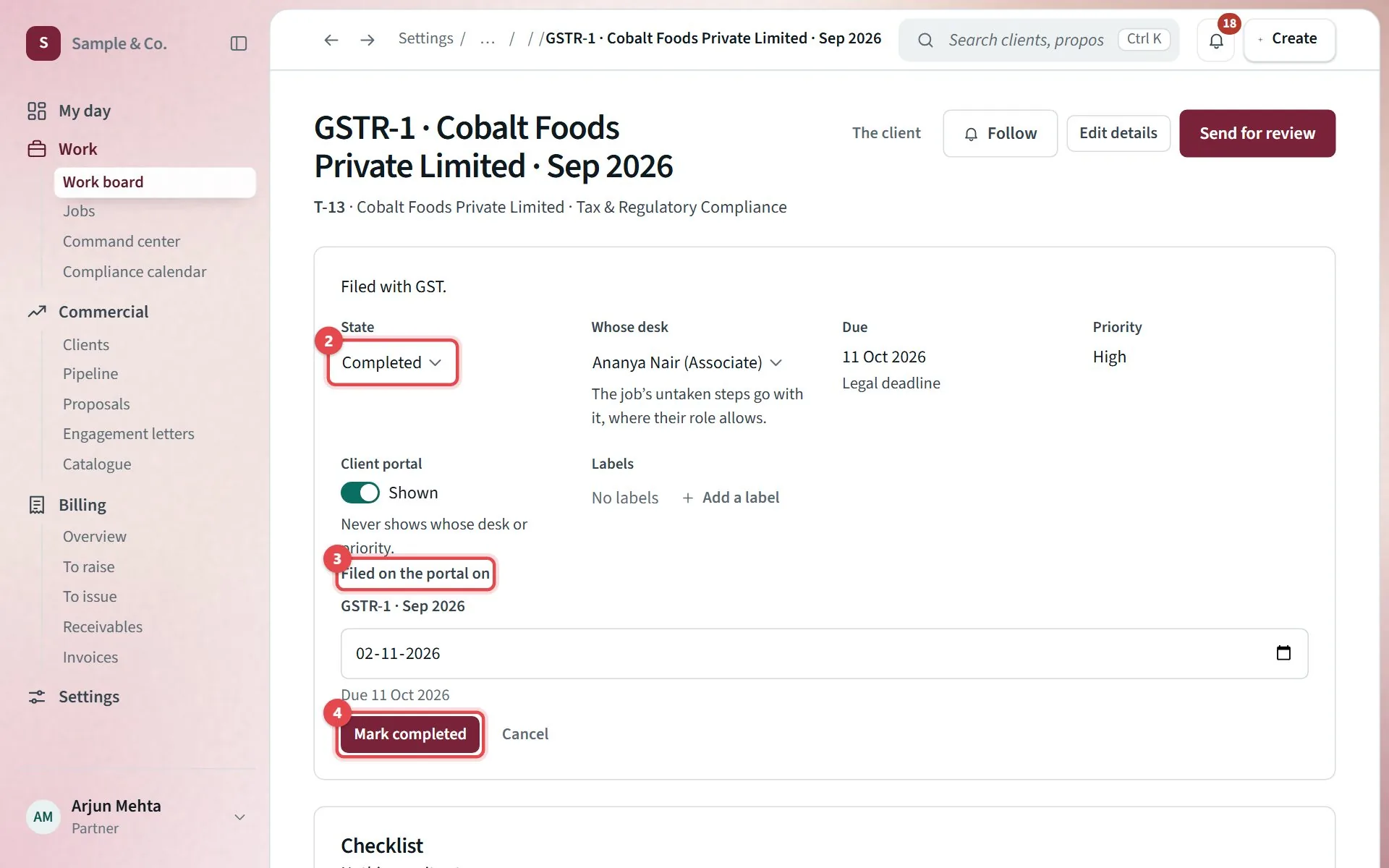 Finishing the task, with the date it was filed on the portal.
On the calendar the filing now reads Filed, with the date. If it was filed after the legal deadline, it adds "late".
 A filed return shows its filing date, and "late" when it was after the deadline.
Reopening the task marks the filing not filed again. Choosing Cancelled files nothing.
| You see | Do this |
|---|---|
| "… has not come yet. Give the day the return for … was actually filed on the portal." | Pick today or an earlier day. |
| "… is before … began, so its return cannot have been filed then. Check the date." | Pick a day after the period began. |