Find your way around a client's page
Who can do it: Everyone
Where: Commercial › Clients , then click a client's name
The buttons at the top start the client's paperwork: New proposal, New engagement letter and Agreed by email (partners only). Edit details changes the name and holds Archive this client.
The list on the left opens each part of the page.
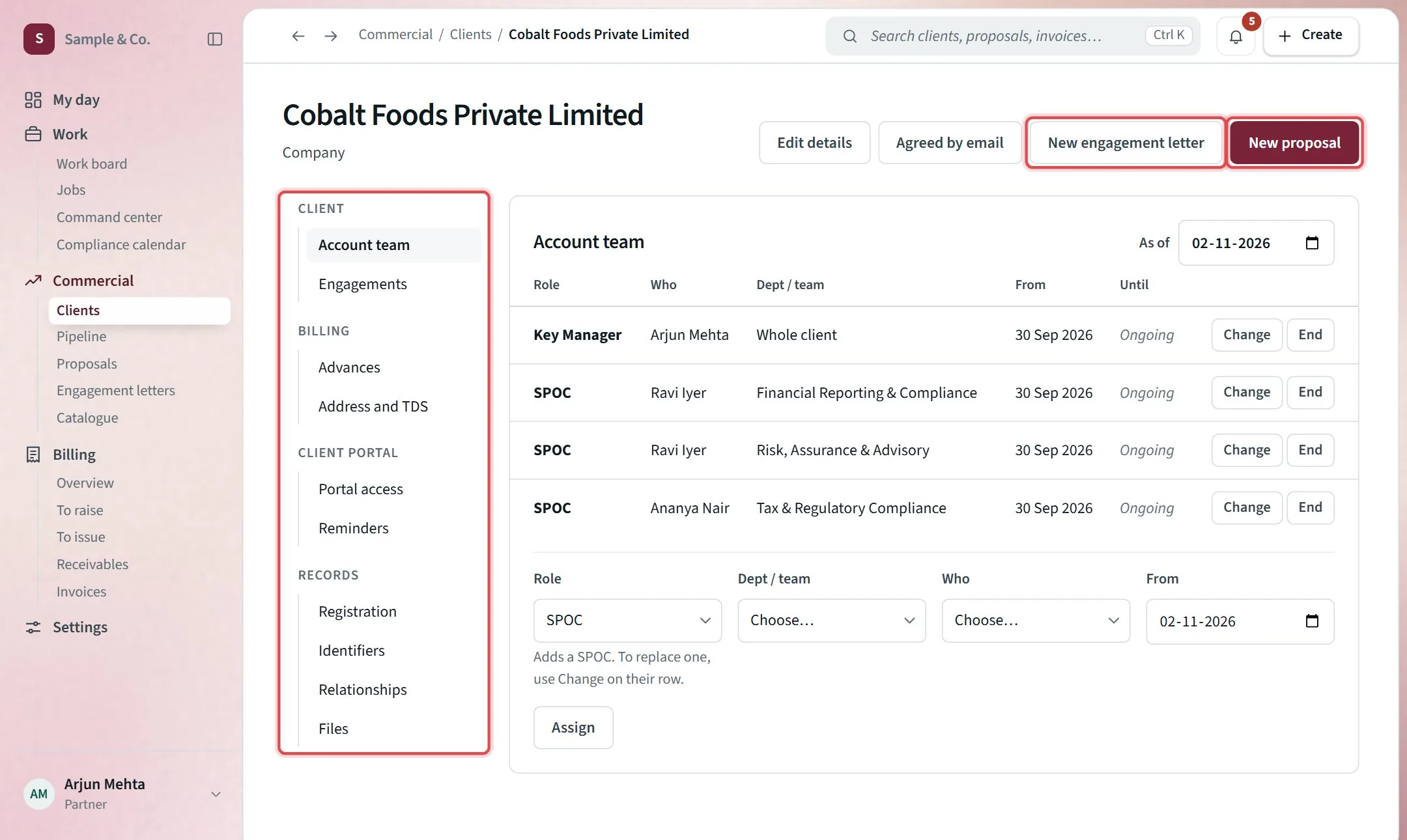 Cobalt Foods' page. The sections are on the left; the paperwork buttons at the top.
| Section | What it holds |
|---|---|
| Account team | The Key Manager and the SPOCs who look after the client. |
| Engagements | Every service the client has signed for. Empty until a letter is signed. |
| Advances | Money the client paid up front. |
| Address and TDS | The address printed on bills, and the TDS the client deducts. |
| Portal access | Who at the client can sign in to the client portal (see the client portal chapter). |
| Reminders | Reminders you put on this client's calendar. |
| Registration | Country, kind of company and year end. |
| Identifiers | PAN, GSTIN, CIN, email and other numbers. |
| Relationships | Directors, signatories, and the other companies in the client's group. |
| Files | Documents kept for the client. |
The client list itself has tabs that help you check your book: My clients, Owing, No Key Manager and No services. No services lists clients with nothing signed yet, which is a good "letter still to send" list.