Turn the accepted proposal into an engagement letter
Who can do it: Partner, manager or associate
Where: The accepted proposal's page, card Write it up as an engagement letter
The services, prices and wording come across. You do not type them again.
-
Open the accepted proposal and scroll to Write it up as an engagement letter.
-
To ask for money up front for the whole letter, tick Ask for an advance and type How much. (You can also ask for an advance on a single service later; see "Ask for an advance, and bill a one-time fee in parts".)
-
To change the subject, the person it is addressed to, or the start date now, open Change the subject, addressee or dates first.
-
Click Write it up.
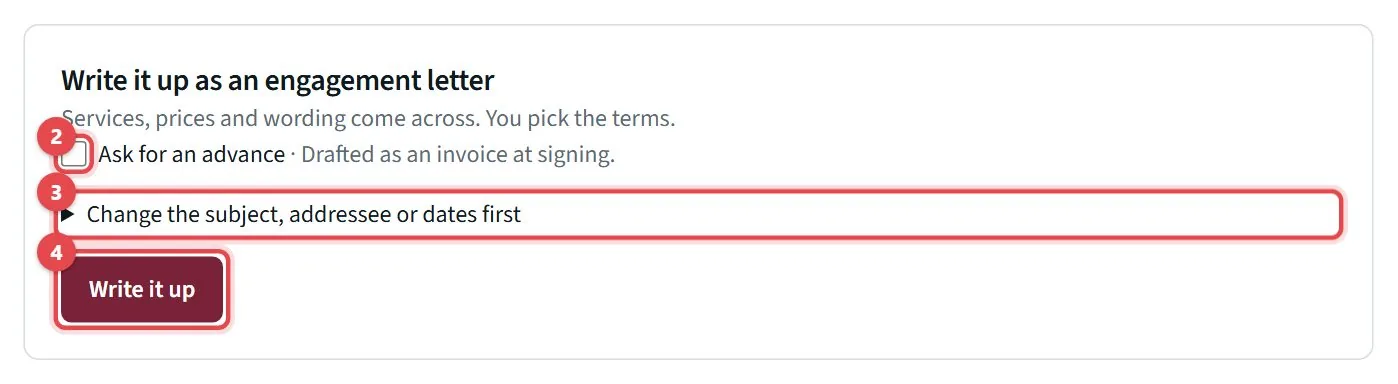 Writing up Nilgiri's accepted proposal as a letter.
BiB opens the new draft letter on its Services step.
Write it up once. The card stays on the accepted proposal even after you have used it, and BiB lets you press it again. A second press makes a second letter for the same work. Before you press, check Commercial › Engagement letters for a letter for that client.
If some lines could not come across, a warning says "Some lines did not carry". Add those services on the Services step.