Chase a late payment
Who can do it: Anyone can chase; only a partner decides on credit hold or legal action
Where: Billing › Receivables and the invoice
Your firm's Payment reminders (Part 1) mark each late invoice as it reaches a step, for example "First reminder" 3 days after the due date.
-
Find late invoices: the Overdue chip on Billing › Invoices , or Outstanding on Receivables.
-
Email or call the client yourself. Use Email on the invoice to send it again.
-
When the client pays, record it (see "Record a payment").
BiB does not chase the client for you A reminder step only records on the invoice that a reminder is due. No email goes and nobody is told to call. Someone at the firm must do it.
When an invoice reaches a credit-hold or legal step, it appears under Waiting for a decision, and the partners are told.
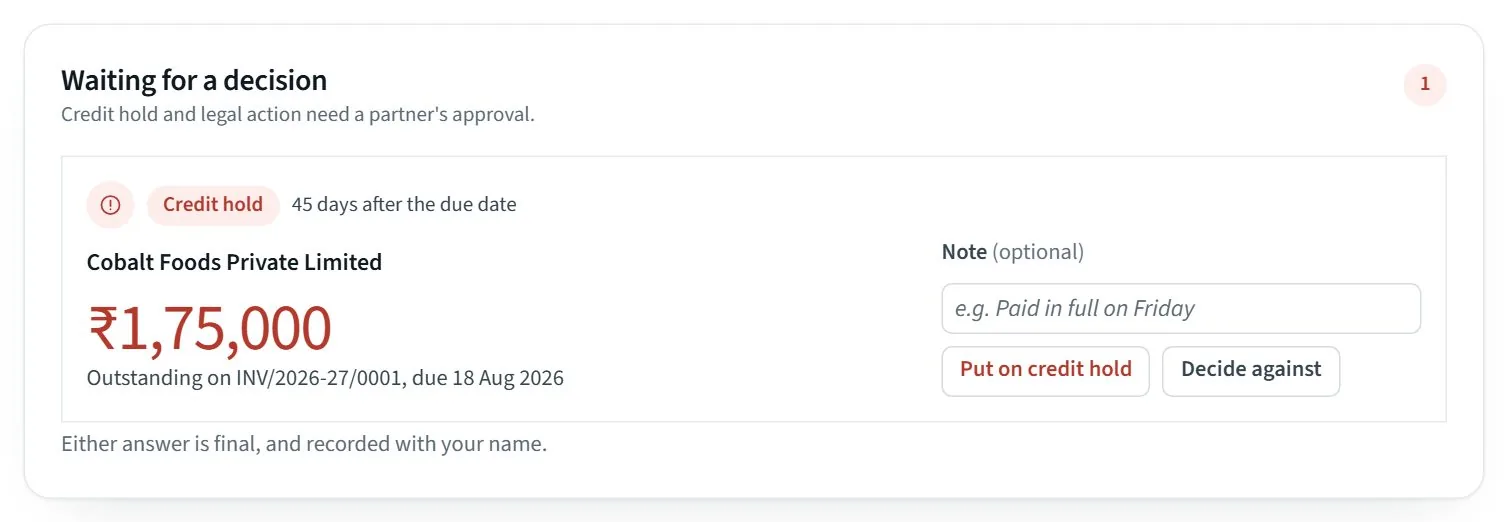 A credit hold waiting for a partner. Put on credit hold, or Decide against.
-
Read the amount still owed. It is today's figure, so a client who paid since shows it.
-
Add a Note if you like, for example "Paid in full on Friday".
-
Click Put on credit hold (or Start legal action), or Decide against.
"Either answer is final, and recorded with your name."
Credit hold blocks nothing BiB records the decision. It does not stop work or new invoices for the client. Tell your team what was decided.