Record a payment
Who can do it: Partner or manager (anyone whose fees are visible)
Where: the invoice, button Record payment
-
Open the invoice from Billing › Invoices or Billing › Receivables .
-
Click Record payment.
-
Fill in Amount received: the money that reached the bank.
-
If the client kept back TDS, fill in TDS deducted.
-
Check Received (the date) and choose the Method: Bank transfer, Cheque, Cash, Card, UPI or Other. Add the Bank reference, for example the UTR.
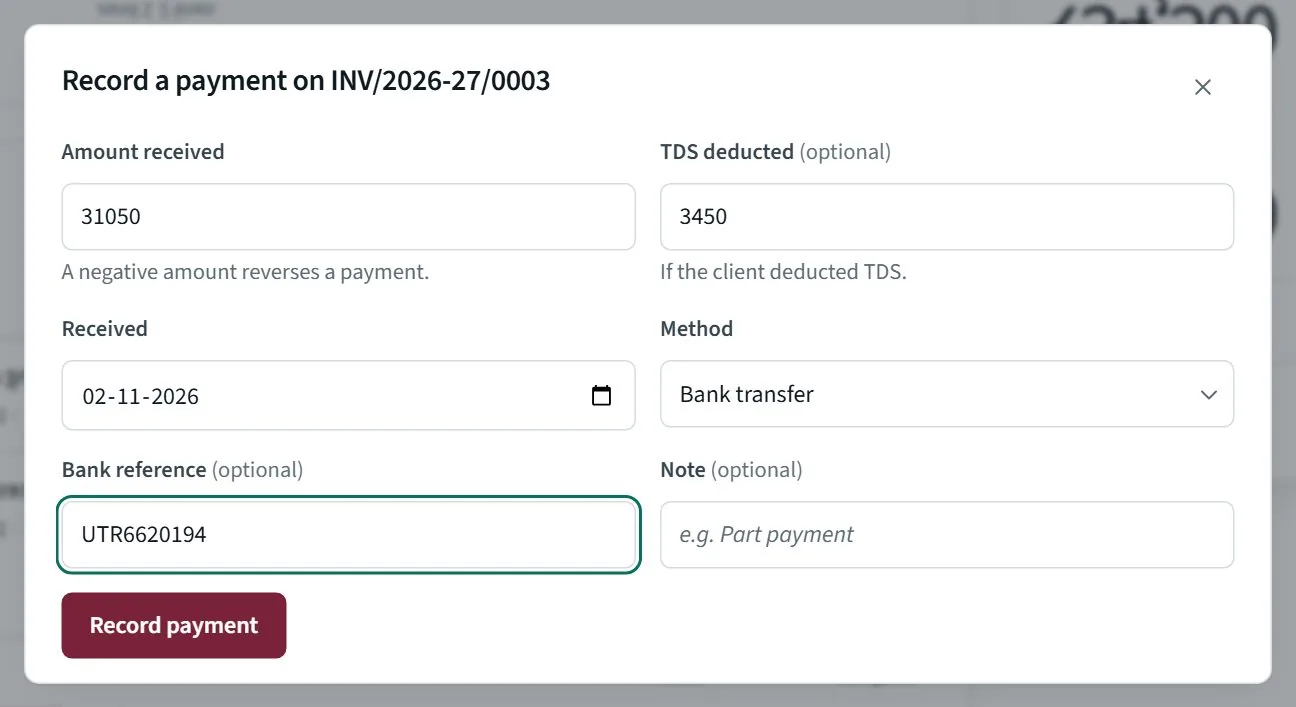 The bookkeeping invoice is ₹34,500. The client paid ₹31,050 and kept ₹3,450 as TDS.
- Click Record payment.
The invoice now reads Paid, or Part paid if something is still owed.
TDS counts as paid Invoice ₹34,500. The client deducts 10% TDS and pays ₹31,050. Record Amount received 31,050 and TDS deducted 3,450. The invoice is paid in full.
Undo a wrong payment with a minus sign "A negative amount reverses a payment." Record -31050 to cancel a payment of ₹31,050.
Paid too much? BiB warns "More than the … outstanding. The difference shows as a credit." You can still save it.