Approve a new client's billing
Who can do it: A partner or manager who can see fees
Where: Work › Command center , the client, Billing tab
Until billing is approved, BiB makes no bills and no advance invoice for the service.
-
Open the client in the Command center and click the Billing tab. Each service shows its Fee, Currency, Frequency and Timing, from the signed letter.
-
Check Bill from (the first day you bill for) and First bill (the date of the first invoice) (2). BiB suggests both. Change them if you need to.
-
Read the lines under the dates (3): "Next bill … for …", and a warning if the dates would bill months that have already gone.
-
For one-time work with a fixed fee you may click Add milestones to bill it in parts, a set number of days after it starts. Click Save milestones when done.
-
Click Approve billing (5).
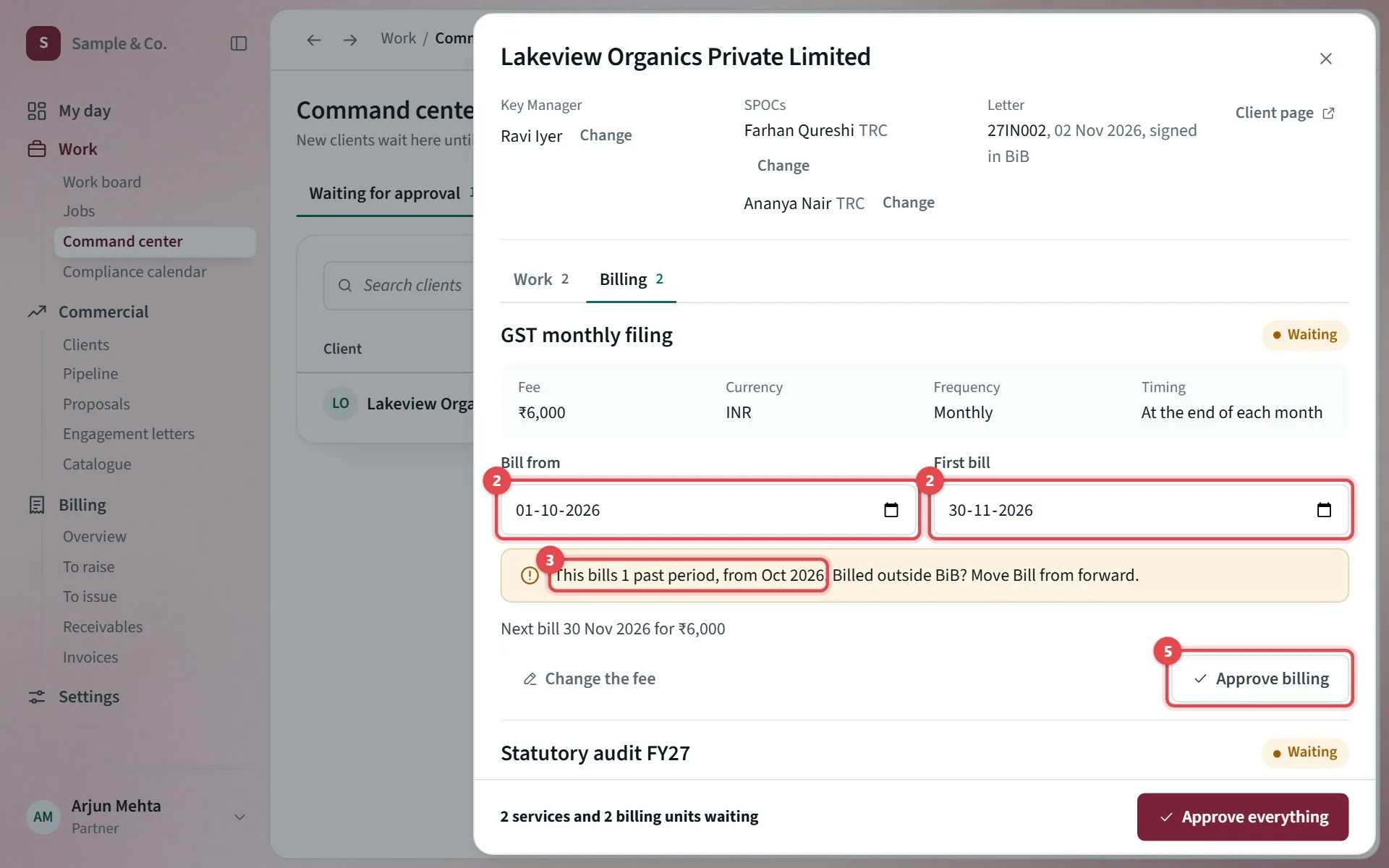 Bill from moved back to 1 Oct: BiB warns that this bills a past month (3).
BiB says "Its bills are made on tomorrow's billing run."
"This bills 1 past period, from Oct 2026." This line means approving will bill October at once. If October was billed outside BiB, move Bill from forward to 1 Nov 2026 before you approve.
Approve billing is greyed out. Both dates must be filled. Point at the button to see "Fill in both dates".
To change the fee itself, click Change the fee. It opens a new engagement letter that replaces the old one (chapter Proposals and engagement letters). The fee always comes from a signed letter.
| You see | Do this |
|---|---|
| "This billing changed after you opened it: its dates, its services or the past periods it would bill. Reload the page and check them again." | Someone changed it while you looked. Reload, check, approve again. |
| "Only somebody whose role lets them approve in the Command center, and who can see fees, can approve its billing." | Ask a partner. |
| "Its billing is already approved, perhaps by somebody else a moment ago. Reload the page to see who approved it." | Reload the page. |