See your firm's jobs
Who can do it: Everyone
Where: Work › Jobs
-
Open Work › Jobs . The In hand tab (1) lists every job, 20 to a page. If steps are on your desk, a box at the top lists them.
-
Read each job's State and Ready from (2), then click a job to open it.
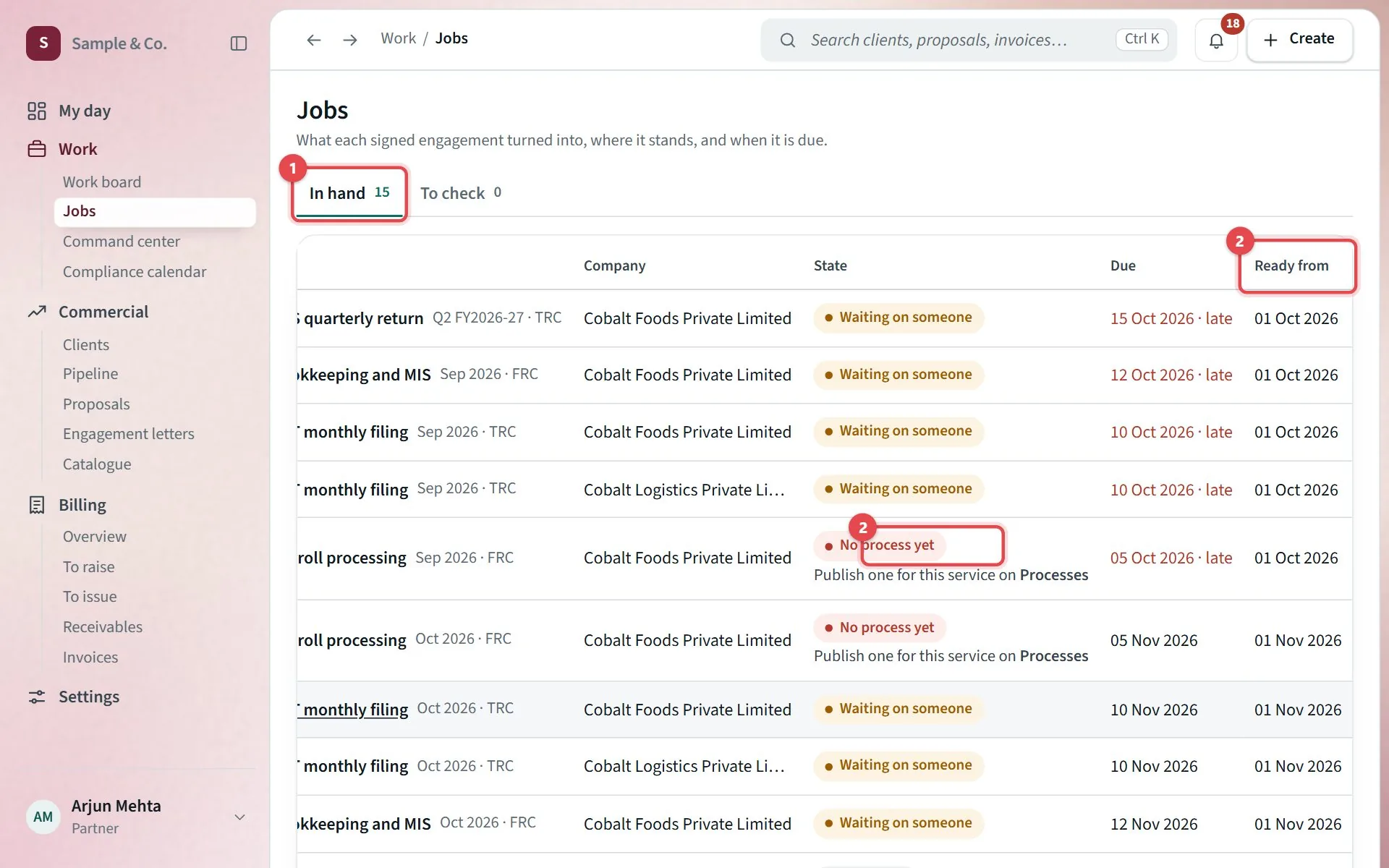 Jobs. Payroll processing has no process yet (2).
| State | What it means |
|---|---|
| Upcoming | This month's job. It opens on Ready from, the day after the month ends. |
| Not started | Open, nobody has started a step. |
| In progress | Someone is working a step. |
| Waiting on someone | A step is waiting for a person. Normal. |
| No process yet | The service has no process. Ask a partner (Part 1, Write a process for a service). |
| Done / Cancelled | Finished. |
Good to know
Why is November's job "Upcoming"? A monthly job works on a month that has ended. Bookkeeping and MIS · Nov 2026 opens on 1 Dec 2026.