Change a filing's date for one client
Who can do it: Dates: a partner or the client's Key Manager. Adding or removing a filing: a partner, a manager or the client's Key Manager.
Where: Work › Command center , the client, Work tab
Use this when the government extends a date, or a client needs a filing the service does not list.
-
Click 15 dates beside the filing (the number is how many periods it has).
-
Click Change date on the period.
-
Change Legal deadline or Start by (3). If you move the Legal deadline, BiB asks why, for example CBDT extended the date.
-
Click Save (4).
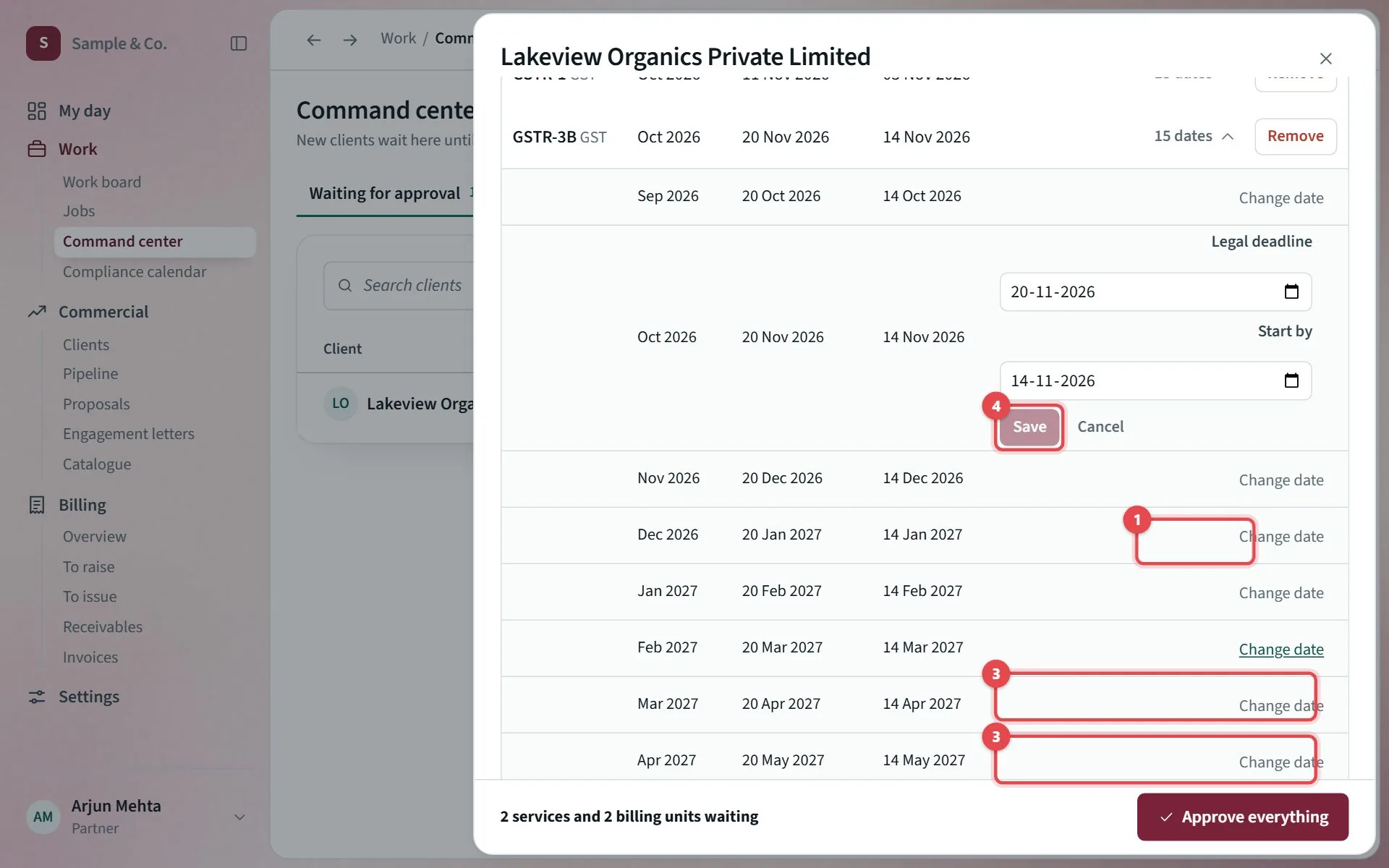 Changing one period of GSTR-3B for Lakeview: Legal deadline and Start by (3).
-
To add a filing for this client only, click Add a filing, then Add beside the filing.
-
To drop a filing for this client only, click Remove on its row. BiB says how many rows it withdrew and how many it kept (those already started or past due).
Moving Start by only moves when the task appears. The task is still due on the Legal deadline.
| You see | Do this |
|---|---|
| "This filing's dates changed while you were changing them. Reload the calendar and try again." | Reload the page and change it again. |
| "This client already has this filing." | Nothing to add. |
| "No other filing fits this client." | Every filing for this client's country is already there. |